Stop sending clients through "press 1 for sales, press 2 for support."
1Stream's AI has a real conversation with the caller, reads their record in Autotask, and hands the tech a verified caller with the ticket already on screen. Then writes the wrap-up notes itself, before the next call comes in.
1Stream's Autotask integration is a deep, bi-directional connection to Datto Autotask PSA. Caller ID is matched against Autotask contacts in real time, the AI Auto Attendant runs a customizable intake, tickets are created automatically with intake answers in the description, identity is verified by SMS or email PIN, and when the call ends the AI posts a full summary, sentiment score, next steps, transcript, time entry, and call recording, all directly to the Autotask ticket. No middleware required.
Two minutes. AI greets, qualifies, verifies. Ticket builds itself. Recording, time entry, and AI summary post automatically.
Five steps. About sixty seconds of caller time. The ticket is already partly written by the time a tech picks up.
"Hi, how can I help you today?" instead of menu prompts. Multilingual, customizable voice and accent, and a clean off-ramp to a human at any moment.
The AI cross-references caller ID against your Autotask contacts and accounts. Sales calls go to the customer's actual rep. Support splits cleanly into new vs. existing.
For new issues, the AI runs a customizable intake (issue, timing, who is affected, troubleshooting tried) and builds the ticket in Autotask automatically.
Confirmed it is really them before the tech ever picks up. PIN scope is per-account configurable, and techs can verify manually from the Autotask helpdesk if needed.
The ticket is already open on screen. Caller is verified. Issue is documented. The tech is solving the problem in seconds, not minutes.
Multiplied across your call volume, it's a full headcount of capacity reclaimed.
Every call leaves a clean record inside Autotask. Intake answers populate the ticket. The recording attaches itself. The time entry posts automatically. Then the AI writes a full summary, a sentiment score, next steps, and a line-by-line transcript, directly to the ticket notes.
The AI's intake questions land in the Autotask ticket description as the conversation happens. Issue, timing, who's affected, troubleshooting steps, all documented before a tech ever picks up. Plus caller ID and call time, captured automatically.
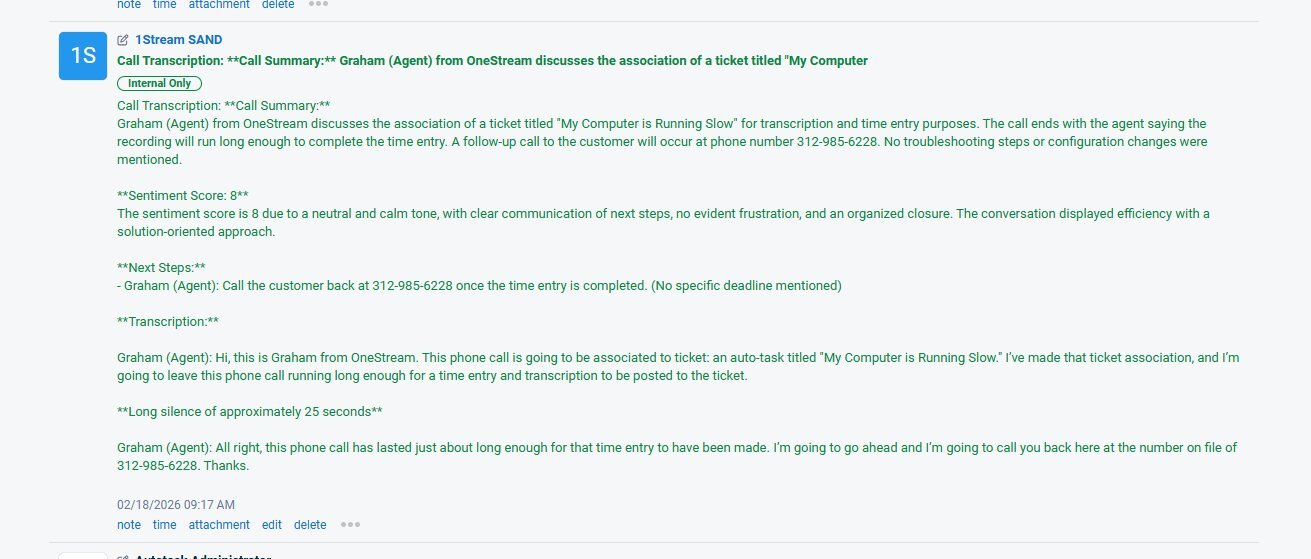
The AI scans the entire conversation and writes a clean summary, a sentiment score with analysis, follow-up steps, coaching tips for the tech, and a line-by-line transcript. The call recording attaches itself. The time entry posts with accurate duration. Tickets stop saying "all set." They start telling the actual story.
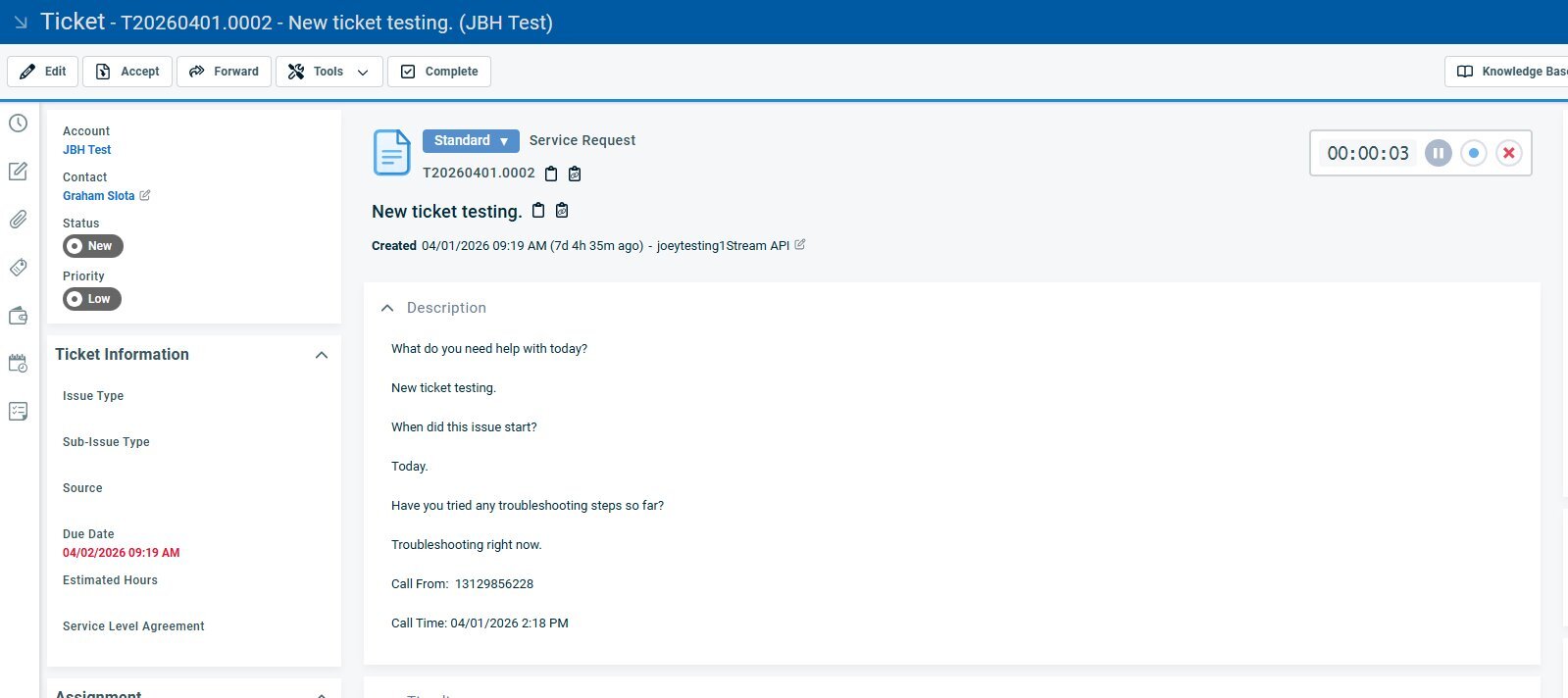
Every screenshot below is a real Autotask view produced by 1Stream during a live call.
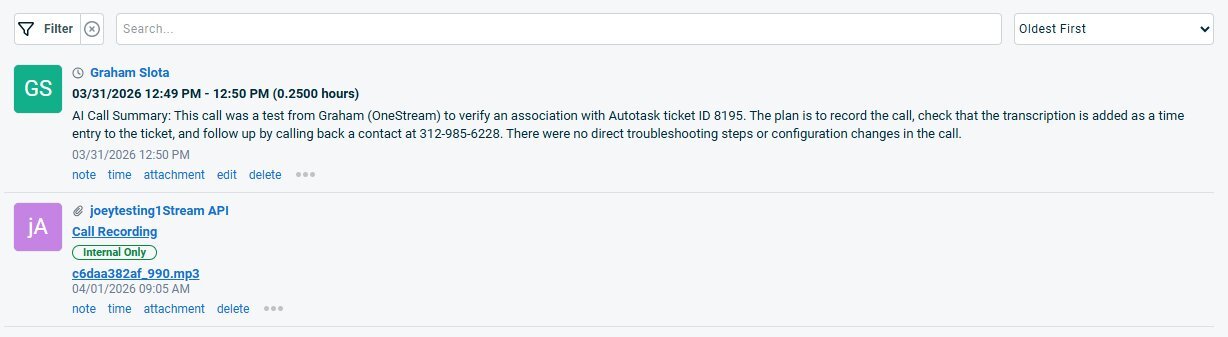
AI Call Summary text in the time entry body. Call recording mp3 attached automatically. Accurate duration captured from the call itself.
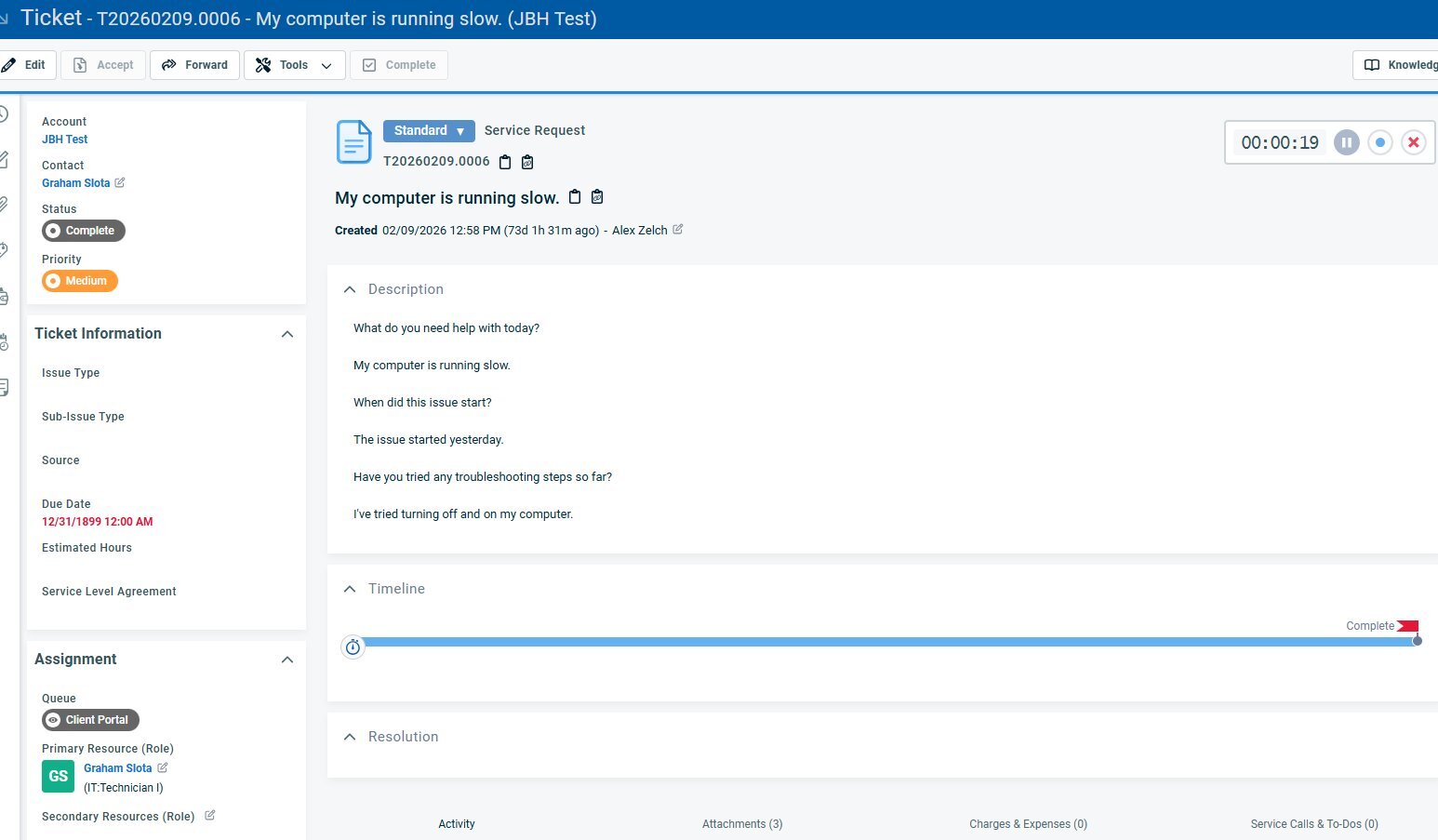
Issue type, description, troubleshooting steps, account, contact, assignment, queue, all driven by the AI intake. Techs accept and start working instead of asking opening questions.
Six dials you can turn. None of it is locked. All of it can match how your MSP actually runs Autotask.
Or only when all lines are busy. Match the AI hours to your service desk hours.
US, AU, UK and more accents. Multilingual support for clients in any market you serve.
Set the exact questions and the workflow callers move through. Different paths for sales vs. support vs. existing-ticket lookup.
Every caller, certain accounts only, or skip entirely. Per-Autotask-account scoping.
Any caller can opt out to a human at any step. The AI is the default, not the only option.
Choose which Autotask fields the AI populates and which it leaves to the tech. Configurable per ticket type.
No add-on tier. No "AI features sold separately." The full 1Stream Autotask integration ships with everything below, configured to your environment during onboarding.
The 1Stream Autotask integration connects your phone system, SMS, and AI agents directly to Autotask (also known as Datto PSA or Kaseya PSA) through Autotask’s native REST API. When a client calls, 1Stream matches the caller ID to an Autotask contact and account, pops the open ticket before the technician answers, verifies the caller with a PIN, and creates or updates the ticket automatically. When the call ends, the AI posts a summary, sentiment score, next steps, transcript, time entry, and call recording to the Autotask ticket, with no manual note-taking.
1Stream is an AI Integrated Communications platform built only for MSPs and IT service providers, sold through the channel, month-to-month, since 2014. The Autotask integration is native and bi-directional. There is no middleware and no separate AI vendor.
Also works with: ConnectWise PSA (CW Manage) · HaloPSA · 200+ integrations |
Eleven of the most-asked questions from MSPs evaluating 1Stream for Autotask.
Yes. Datto PSA and Kaseya PSA are the same product as Autotask under Kaseya’s naming. The 1Stream integration uses the Autotask REST API, so it works the same way regardless of which name appears in your contract.
1Stream integrates natively with Datto Autotask PSA, the cloud-based professional services automation platform from Datto (Kaseya). The integration uses the Autotask REST API and requires an Autotask API user with appropriate permissions. Both single-tenant and multi-tenant Autotask environments are supported.
Yes. 1Stream performs real-time caller ID lookup against your Autotask contacts and accounts on every inbound call. The AI uses that context to route the call correctly: sales calls go to the assigned account manager, existing client support calls split into new ticket vs. existing ticket paths, and unknown callers route through a configurable intake flow.
When the AI completes its intake conversation, the ticket is created in Autotask automatically. The intake answers populate the ticket description. Caller ID, call time, and call duration are captured automatically. Custom intake questions and ticket field mappings are fully configurable to match your existing Autotask workflow and queue structure.
Yes. The call recording is uploaded to the Autotask ticket as an attachment automatically when the call ends, with a sequential filename for reference. The recording is marked Internal Only by default so end clients viewing the ticket through a portal do not see it.
Yes. A time entry is created on the Autotask ticket with the accurate call duration when the call ends. The entry is associated with the responding technician. AI Call Summary text appears in the time entry as the work description, so the time is documented with context instead of leaving technicians to write summaries manually.
Yes. The intake questions, conversational flow, voice and accent (US, AU, UK and more), when the AI answers, PIN scope, off-ramps to a human, and wrap-up depth are all fully configurable.
No. 1Stream connects to Autotask directly through the official Autotask REST API. No middleware platforms, no Zapier, no third-party integration brokers required. The connection is bi-directional and real-time, with caller lookup and ticket events firing within seconds of the originating action.
1Stream is the communications platform: voice, SMS, contact center, and the AI agents run on 1Stream and connect natively to Autotask. It is not an add-on that sits on top of a separate phone vendor. Microsoft Teams users can keep Teams and add 1Stream for direct routing, contact center, SMS, and the Autotask integration.
MSPs running hosted or self-hosted 3CX regularly ask how to push AI call summaries and auto-created tickets into Autotask. 3CX’s CRM templates expose call metadata only, not the summary, so it cannot be done natively. 1Stream is a purpose-built alternative: the AI summary, transcript, time entry, and recording post to the Autotask ticket automatically, and many partners migrate from 3CX for exactly this reason.
Yes. The AI Attendant answers after hours, runs intake, verifies the caller, and creates the Autotask ticket. 1Stream Signal then escalates to the on-call technician by call, text, and email along the path you define. The AI can run always, after hours only, or only when every line is busy.
Book some time with our team to see this live. Twenty minutes, with the AI handling a real call inside your PSA.

