


We have added a simple menu into the Control Portal to allow you to enable and adjust E.164 number processing.
What is E.164 for exactly?
It's all about outbound calling specifically around how carriers treat international dialing prefixes.
E.164 format would present a number as say +123456
Your provider may not accept the + sign so when a user has stored their contact as +123456 and tries to dial out, the provider will reject the call.
- E164 Processing automatically converts those numbers to say 00123456 before they are sent out via your trunk.
- It can also convert a local number from say +44 123456789 to simply 0123456789
Navigate to a system you want to manage, Under the Dashboard drop down, go down to Settings
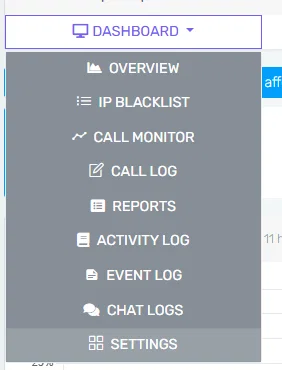
Select E164 processing
Here you will see the options that can be adjusted 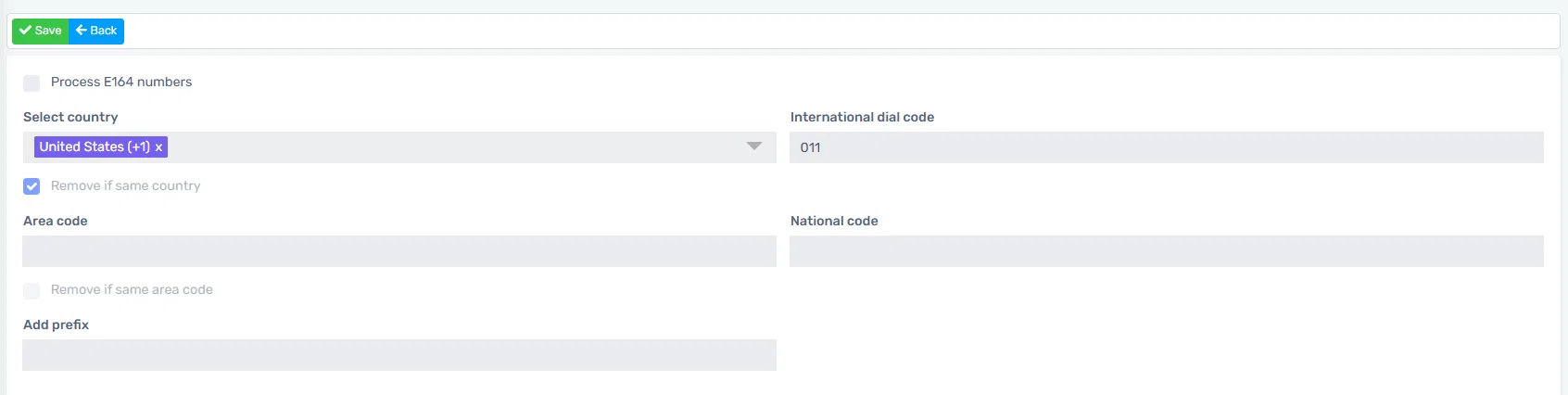
Select country: Select the country you are in so the system knows your country code. For our examples lets use US as our country.
Remove if same country: When this option is selected and you try calling the same country using the E164 format the country code will be removed from the called number.
Example: Number dialed as +12345678910 will be converted to 2345678910.
International Dial Code: If you call a different country using the E164 format then the number will be converted and the international dial code will be added. If you are in the US for example this will be 011. This will enable you to make international calls without the "+"
Example: Number dialed as +44123456789 will be converted to 01144123456789
Area Code: Here you can add your area code so if you are making calls within your area and the area code is not required then you can strip it if the "Remove if same Area Code" is selected.
Example: Our area code is set to 813. Number dialed as +181345678910 will be converted to 45678910
National Code: If you need to add a national code to make calls then you can add a national code here and it will be prepended to the number during the processing.
Example: National code set to 8. Number dialed as +12345678910 will be converted to 82345678910
Add Prefix: A prefix can be added in case it is needed or if you want to use it to select an outbound rule. E164 rules are processed before the outbound rules.
Example: Prefix is set to 2. Number dialed as +12345678910 will be converted to 22345678910