

Halo PSA Ticket default billing rate
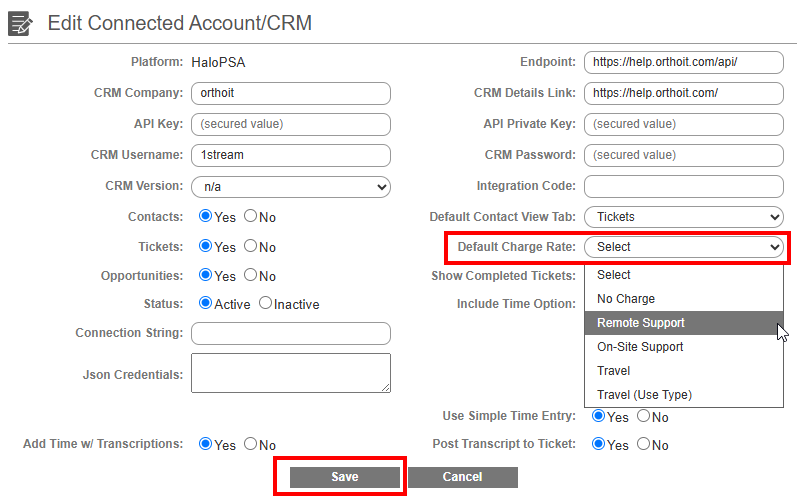
Head over to your 1Stream Integrations Portal and follow the steps below to set a Default Charge Rate that is used with our Automatic Time Entry feature:
1. Login to 1Stream's Integration Portal.
2. Navigate to Administration -> Manage Organization
3. Navigate to Connected Account and CRM Settings -> HaloPSA
4. In the Default Change Rate dropdown menu, select your preferred Charge Rate that will be used
5. Save
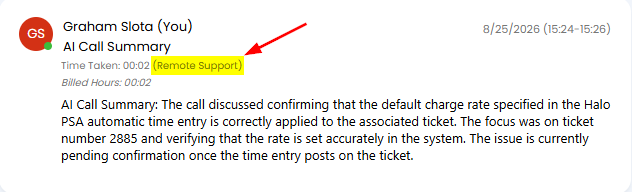
Here is an example of an Automatic Time Entry that used the "Remote Support" Charge Rate in our sandbox testing system with this feature.
HaloPSA Ticket Fields + Custom Fields
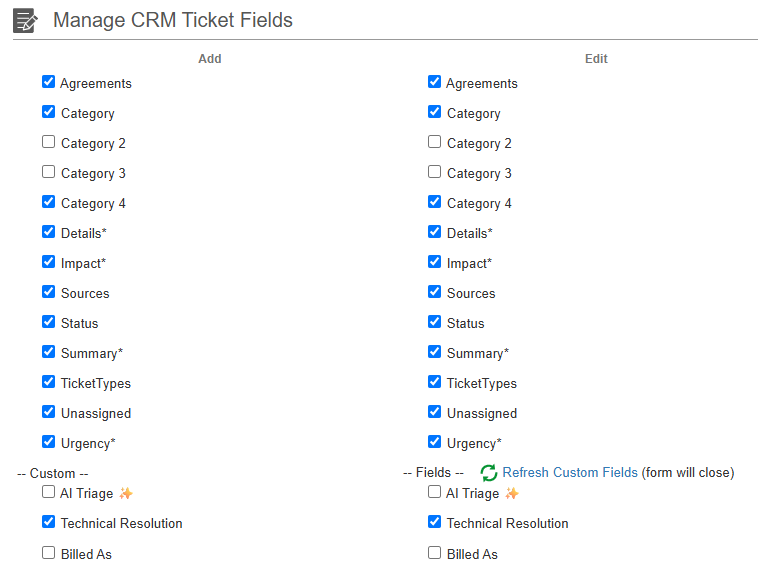
You can now customize which HaloPSA Ticket Fields and Custom Fields are available for use in 1Stream. These are used for new ticket creation, editing of existing tickets, and 1Stream features that can automatically create new tickets. See our article here for more info.
Voicemail to Ticket Improvements
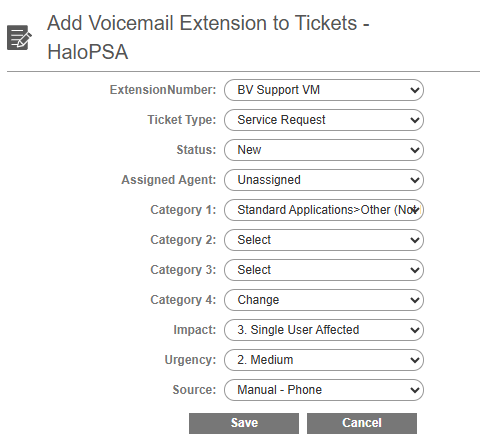
We've made improvements to this feature for HaloPSA.
AI Voice Triage Agent w/ HaloPSA
Fixed an issue for HaloPSA where tickets created via 1Stream AI Triage Agent did not send the Ticket Type field correctly.