
Your NinjaOne, answering the phone.
1Stream's AI has a real conversation with the caller, reads their record in NinjaOne, and hands the tech a verified caller with the ticket already on screen. Then writes the wrap-up notes itself, and escalates RMM alerts until a human confirms.
What does the 1Stream NinjaOne integration do?
1Stream's NinjaOne integration works with NinjaOne ticketing, PSA, and RMM. Caller ID is matched against NinjaOne contacts in real time, the AI Auto Attendant runs a customizable intake, tickets are created automatically with intake answers in the description, identity is verified by SMS or email PIN, and when the call ends the AI posts a full summary, sentiment score, next steps, transcript, time entry, and call recording, all directly to the NinjaOne ticket. On the RMM side, NinjaOne alerts escalate to your team until a human confirms. No middleware required.
The NinjaOne integration is available now on 1Stream Engage plans and above, month to month.
Take the call. We handle the admin work.
AI should take everything around the call: find the contact, open the ticket, type the notes, and log the time. Your tech just takes the call.
- Before your tech says hello. The caller is identified. Their NinjaOne contact record and open ticket are on screen before the conversation starts.
- While they talk, nobody's typing. Your tech listens to the customer, with no hunting for the right ticket and no notes to type mid-call.
- They hang up. AI does the admin. An AI call summary is added to the ticket and the time entry is logged. Your tech moves to the next call.
A sample call. Priya Shah, office manager at Harbor Dental, has made four calls this month, and her last call was a password reset. She has open ticket #48213, "Outlook won't sync." The AI call summary reads: "Outlook stopped syncing after a password reset. Cleared cached credentials and confirmed mail is flowing. Follow up Friday." The time entry is logged at 8 minutes 42 seconds.
Works with whichever PSA you run: Autotask, ConnectWise, HaloPSA, and NinjaOne.
Everything around the call.
From the first ring to the finished ticket, AI handles the work your techs should not be typing.
AI Attendant
The modern auto attendant. Callers talk instead of pressing keys.
AI Triage Agent
Collects the details before anyone answers. Takes overflow calls when you are busy, or replaces voicemail and your answering service.
AI Intelligent Routing
Routes each call to the right person instead of ringing everyone.
AI automated user ID and verification
Uses your PSA or CRM data to identify callers automatically.
Screen pop to the PSA ticket
The caller's contact and open ticket are on your tech's screen when the call lands.
Auto ticket creation on incoming calls
A ticket is created as the call comes in. No one has to start it.
AI note taking, transcription, and analysis
AI enters the notes, activities, and time entries for you, including auto time entry from the call summary.
AI alerting and notification
Set your escalation path. Trigger calls, texts, and emails to flag on-call techs or send automated alerts.
1Stream and Rewst RPA integration
Pair 1Stream with Rewst to automate the work that follows the call.
What the client experiences, from first ring to closed ticket.
Five steps, about sixty seconds of caller time. The ticket is already partly written by the time a tech picks up.
1. AI answers
"Hi, how can I help you today?" instead of menu prompts. Multilingual, customizable voice and accent, and a clean off-ramp to a human at any moment.
2. NinjaOne-aware routing
The AI cross-references caller ID against your NinjaOne contacts and organizations. Sales calls go to the customer's actual rep. Support splits cleanly into new versus existing.
3. Smart triage
Existing ticket? Last 4 digits, straight to the tech on it. For new issues, the AI runs a customizable intake and builds the ticket in NinjaOne automatically.
4. Identity verification
A 4-digit PIN by SMS or email confirms it is really them before the tech ever picks up. PIN scope is configurable per account.
5. Tech picks up
The ticket is already open on screen, the caller is verified, and the issue is documented. The tech is solving the problem in seconds, not minutes.
6+ minutes saved per call
On average, about 3 minutes on routing and intake and about 3 minutes on after-call admin, with no more "all set" notes.
Every call, documented.
When the call ends, the ticket already has the full story. Nobody types it up.
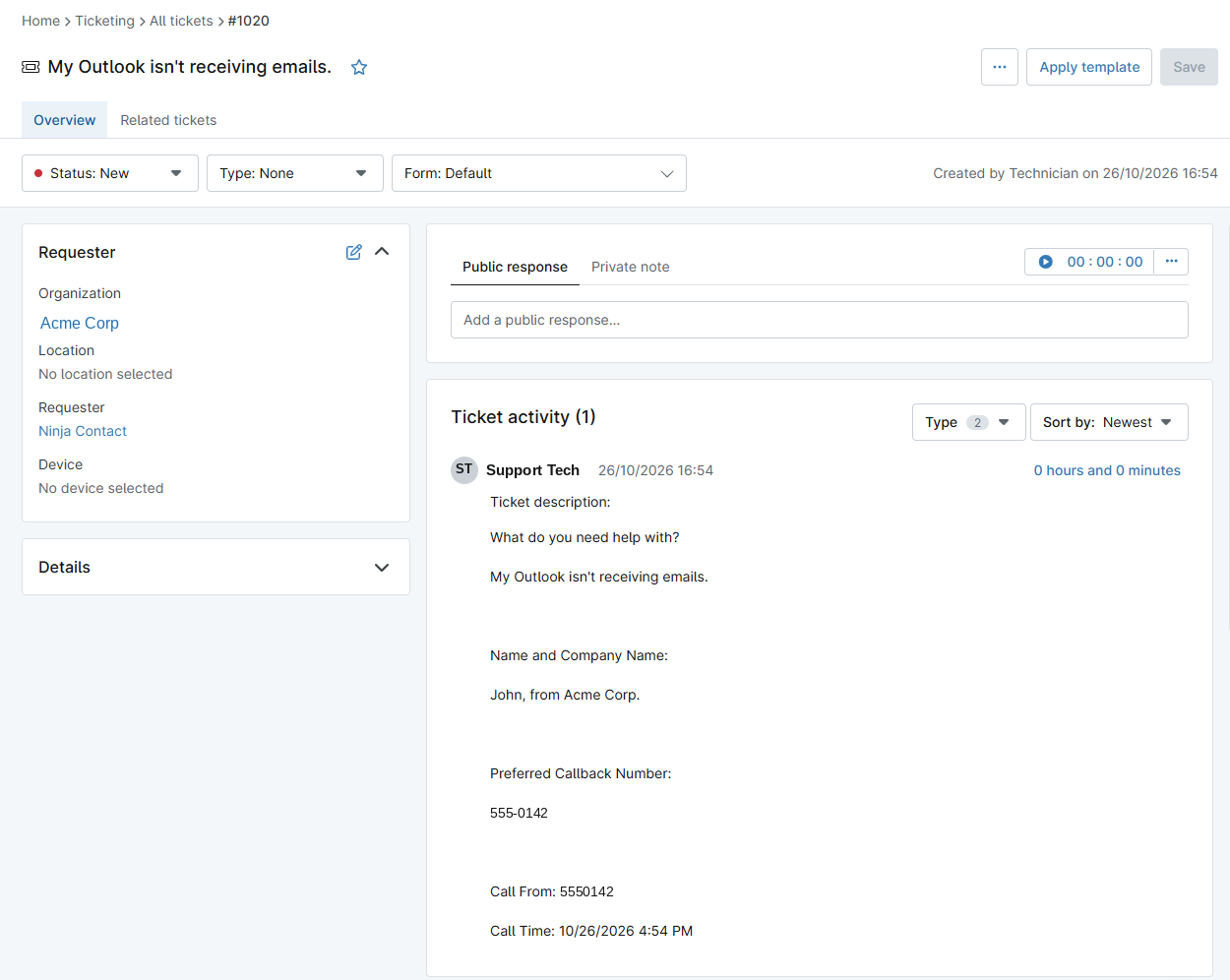
- A ticket from the call. The issue, caller name and company, callback number, and call time, taken from the triage questions. Triage answers become the ticket description.
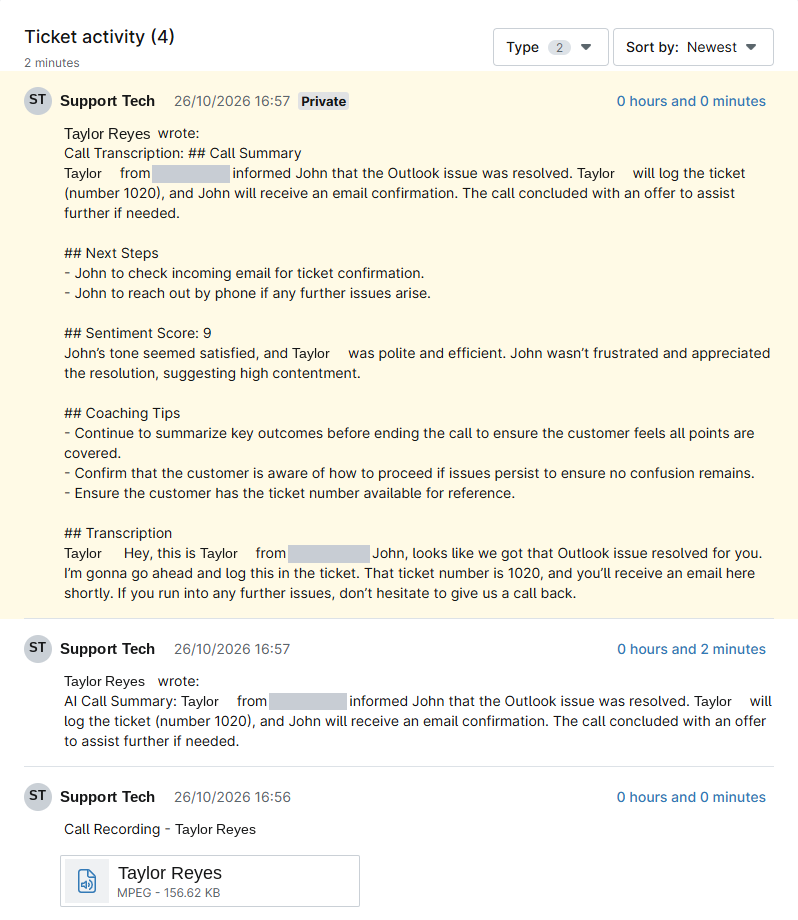
- The recording. The call recording is attached to the ticket.
- An AI call summary. A short summary is added as a note your whole team can read.
- A private note for your team. Transcript, next steps, sentiment score, and coaching tips, so you can review calls without listening to them.
- Time, logged. The time entry is created from the call summary.
See the ticket the call creates.
1. The ticket, created from the call: triage answers become the ticket description. 2. The recording, summary, and private note, added when the call ends.
Test ticket shown. Names and contact details have been changed. Available on 1Stream Engage plans and above.
Never miss an alert.
When a NinjaOne alert fires, 1Stream follows your triage and escalation plan and notifies your team. It keeps going until a human confirms they have it.
- Your plan, your order. Escalation follows the triage plan you set.
- Phone, text, or email. Reach the right tech however they answer.
- A human confirms. Alerting stops when someone acknowledges it.
What happens at 2 a.m.
- A NinjaOne alert fires. The notification channel sends it to 1Stream.
- 1Stream runs your escalation plan. Phone, text, and email, in the order you set.
- A human confirms. The alerting stops. Nothing gets dropped.
The RMM integration handles alerts. The ticketing and PSA integration handles inbound calls: the AI answers and triages, identifies the caller, opens the ticket, and writes the notes and time entry. Most MSPs want both. Available on 1Stream Engage plans and above.
Tune every part of it.
Six dials you can turn. None of it is locked, and all of it can match how your MSP runs NinjaOne.
When AI answers
Always, weekends, or after hours, or only when all lines are busy. Match the AI hours to your service desk hours.
Voice and language
US, AU, UK, and more accents, with multilingual support for clients in any market you serve.
Intake questions
Set the exact questions and the workflow callers move through, with different paths for sales, support, and existing-ticket lookup.
PIN scope
Verify every caller, certain accounts only, or skip it entirely, scoped per NinjaOne organization.
Off-ramps
Any caller can opt out to a human at any step. The AI is the default, not the only option.
Wrap-up depth
Choose which NinjaOne fields the AI populates and which it leaves to the tech, configurable per ticket type.
Every piece, in the box.
The full 1Stream NinjaOne integration ships with everything below, configured to your environment during onboarding. It is available on 1Stream Engage plans and above, month to month.
- Identification: caller ID lookup against NinjaOne contacts; organization match across NinjaOne; 4-digit PIN by SMS or email.
- Routing: route to the assigned account manager; existing ticket lookup by last 4 digits; queue-based routing to NinjaOne technicians.
- Ticket creation: auto-create a NinjaOne ticket on a new call; custom intake fields in the description; configurable ticket type and queue.
- Post-call: AI call summary as a ticket note; sentiment score with analysis; next steps captured automatically; coaching tips for the technician; line-by-line transcript on the ticket; time entry posted with accurate duration; call recording attached.
- Alert escalation: NinjaOne alerts trigger calls, texts, and emails to your on-call team and keep escalating until a human confirms.
- Voice features: multilingual plus US, AU, and UK voice options; configurable hours for AI versus live answering.
How the 1Stream NinjaOne phone integration works.
The 1Stream NinjaOne integration connects your phone system, SMS, and AI agents directly to NinjaOne ticketing, PSA, and RMM. When a client calls, 1Stream matches the caller ID to a NinjaOne contact, pops the open ticket before the technician answers, verifies the caller with a PIN, and creates or updates the ticket automatically. When the call ends, the AI posts a summary, sentiment score, next steps, transcript, time entry, and call recording to the NinjaOne ticket, with no manual note-taking.
1Stream is an AI Integrated Communications platform built only for MSPs and IT service providers, sold through the channel, month to month, since 2014. The NinjaOne integration is native, with no middleware and no separate AI vendor.
- Screen pops: the NinjaOne contact and open ticket appear on the technician's screen before the conversation starts.
- Automatic call notes: the AI writes the issue, fix, and result to the ticket note the second the call ends.
- Automatic time entries: call duration is logged as a NinjaOne time entry against the correct ticket, with the AI summary as the work description.
- Caller verification: a 4-digit PIN by SMS or email confirms identity before a technician takes action, scoped per account.
- Auto-ticketing: new issues run through your intake questions and create the ticket automatically, with the answers in the description.
- Sentiment on every ticket: each call is scored, visible to the tech and the account manager.
- NinjaOne-aware routing: each call routes to the right person instead of ringing everyone, by caller ID, ticket, or contact role.
- AI Attendant and AI Triage: callers talk instead of pressing keys, and the AI collects the details before anyone answers, takes overflow calls when you are busy, or replaces voicemail and your answering service.
- Click-to-dial: place calls from tickets and contacts with automatic call logging.
- Alert escalation: NinjaOne alerts escalate by call, text, and email until a human confirms.
- SMS and Microsoft Teams: text conversations and Teams calls logged to the same ticket as voice.
- Recording and transcript on the ticket: attached to the ticket note.
NinjaOne integration: common questions
Which 1Stream plans include the NinjaOne integration?
The NinjaOne integration works on 1Stream Engage plans and above, month to month.
Does this only work with NinjaOne?
No. 1Stream has 200+ native integrations, including Autotask, ConnectWise, and HaloPSA. The NinjaOne ticketing and PSA integration is the newest, and it works alongside whichever PSA you run.
How is the NinjaOne RMM integration different?
The RMM integration escalates NinjaOne alerts to your team until a human confirms. The ticketing and PSA integration handles inbound calls: AI answers and triages, identifies the caller, opens the ticket, and writes the notes and time entry. Most MSPs want both.
What does a demo look like?
30 to 60 minutes in a sandbox PSA, with no slide deck. A 1Stream specialist will reply with a couple of times if you book online.
Can I buy 1Stream directly?
No. 1Stream is sold only through partners, to MSPs and IT service providers.
Does the AI know who is calling from my NinjaOne data?
Yes. The caller is identified against NinjaOne contact records, and their contact record and open ticket are on screen before the conversation starts.
Do the recording and time entry post to NinjaOne?
Yes. The recording is attached to the ticket, an AI call summary is added as a note, and the time entry is created from the call summary.
Can the AI replace voicemail or my answering service?
The AI Triage Agent collects the details before anyone answers, takes overflow calls when you are busy, or replaces voicemail and your answering service.
See it running inside your NinjaOne.
Book some time with our team to see this live: 30 to 60 minutes in a sandbox, with the AI handling a real call and an alert escalating.